Roxy sent these reports during and after a trip. Each reported item quotes her report, shows her screenshot or a frame from her screen recording, and then describes what we found, what we changed, and where the change stands.
Status
- Data correction on the reported trip: done in production on October 5.
- Trip-completion server change: deployed to production on October 5. The new onboarding interest limit reached production on October 6.
- Earlier trip fixes: Roxy's TestFlight build 27 use is confirmed. Build 28 is now available in the same group and includes those fixes.
- Onboarding interest limit: the API and app now allow three to ten selections. The app update is available in TestFlight build 28. Apple review remains on build 26.
Choosing more than five interests during onboarding
Roxy asked
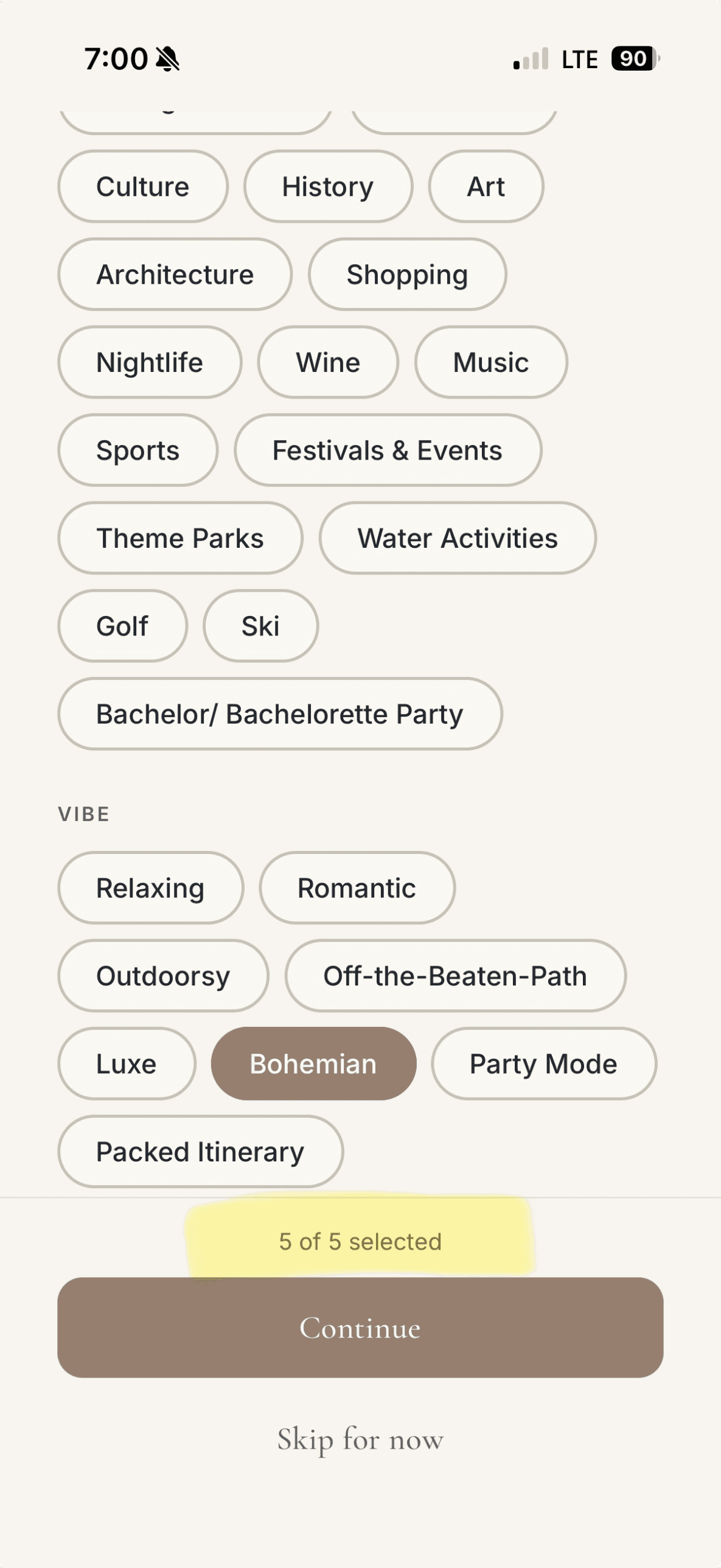
"Picking only five out of all these categories seemed way too limiting. Do we have to put a cap?"
What we found
- The app limited people to five interests across all categories, including Vibe. This was a product limit, not a storage limit.
- The app's fallback save path also enforced a maximum of five. Changing the screen alone would leave those saves failing.
What we changed
- The API now defines a minimum of three and a maximum of ten interests. It returns those limits with the onboarding choices and validates both save paths against them.Server, apps/api/src/server/trpc/routers/me.ts and trip-tags.ts
- The updated app uses the API's limits for its instructions, selection counter, tap limit and Continue button. If the limits are missing or the choices cannot load, it keeps the three-to-five fallback. Older builds keep their existing three-to-five picker.App, apps/mobile/app/(onboarding)/interests.tsx and apps/mobile/src/api/client.ts
Status
- Merged through PR 773 and deployed to staging from commit e0399a3b. Both API save paths accepted three, five and ten interests and rejected two and eleven. The catalog groups were unchanged. Build 26 compatibility passed source and HTTP checks; this was not a build 26 device test.
- Checked with Maestro 2.11 on the simulator. Ten selections saved and matched the database; the eleventh was refused. Deselecting, reselecting and Continue passed. An older API without selection rules kept the three-to-five limit, and a failed catalog request allowed five fallback interests to save. Test data was restored.
- Published to Beenlist QA on October 5 for runtime 1.0.0, using staging services. The production API change was deployed on October 6.
- The updated picker is available in TestFlight build 28. It was not in build 27. Apple review remains on build 26.
Email reservations moved to Experience and dated September 30
Roxy reported
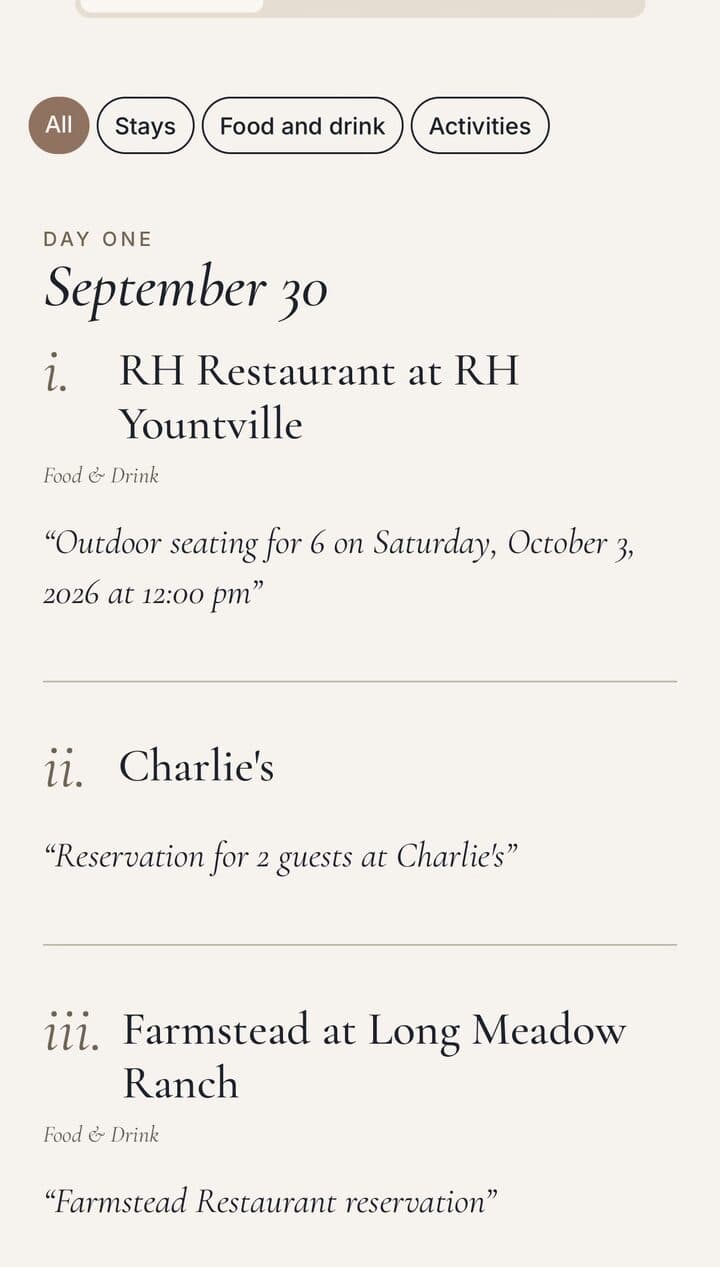
"Now that my trip is over, it looks like everything I previously saved from an email confirmation got accidentally moved over to Experience, and all to Sept 30 (day before my trip started)."
What we found
- When a trip's end date passed, a scheduled server job marked the trip complete. It also converted the trip's planned stops to visited, including reservations imported from email.
- The same job replaced each converted stop's arrival time with the trip's start date at midnight UTC. In US time zones that time displays as the previous day, so every reservation showed under September 30.
What we changed
- The trip-completion job no longer converts email reservations. They stay in Saved until the owner taps Mark as been. Other planned stops still convert as before.Server, apps/api/src/server/trip-lifecycle.ts
- Mark as been on an email reservation opens with the booking's arrival and departure times instead of today's date.App, apps/mobile/src/trip/TripSaved.tsx
- On the reported trip, four reservations that had not been edited were moved back to Saved with their booking times. One reservation that had been edited since was left as it was.Data correction
Status
- Server change: verified on staging, including two scheduled job runs. Deployed to production on October 5.
- App change: verified on the simulator and delivered in TestFlight build 27, which Roxy has used. Build 28 is available in the same group. The public App Store release remains held.
- Data correction: done in production on October 5 and checked by reading the rows back.
Scrolling stopped when a swipe started on a photo at a slight angle
Roxy reported
"Also when I scroll, it looks a bit glitchy."
Her screen recording shows the page but not where her finger touched, so it cannot show which gesture failed.

What we found
This is our reproduction, not Roxy's description. We have not proven it is exactly what she saw.
- On trip, visit and place pages, photos sit in a horizontal strip inside the page, which scrolls vertically.
- A mostly up-or-down swipe that started on a photo, at a slight sideways angle, was taken by the photo strip, and the page did not move. The same swipe starting on text scrolled the page about 297 points.
What we changed
- The photo strips take a swipe only when it is clearly sideways. A mostly vertical swipe that starts on a photo scrolls the page. This applies to trip pages (Experience and Photos tabs), visit pages and place pages.App, shared helper apps/mobile/src/trip/usePhotoPager.ts, used by StopCarousel.tsx, VisitDetail.tsx and place/sections.tsx
Status
- Checked on the simulator. Scrolling from a photo and paging through photos passed in all four places: the Experience and Photos tabs of a trip, the visit page, and the place page. Tapping to open a photo passed on trip and visit pages. The place page has no full-screen photo view. VoiceOver paging was reviewed in code, not tested with VoiceOver.
- App change: Available in TestFlight. Roxy's use of build 27 is confirmed, and build 28 is available in the same group. The public App Store release remains held.
Tapping the October 3 RH visit opened the September 30 entry
Roxy reported
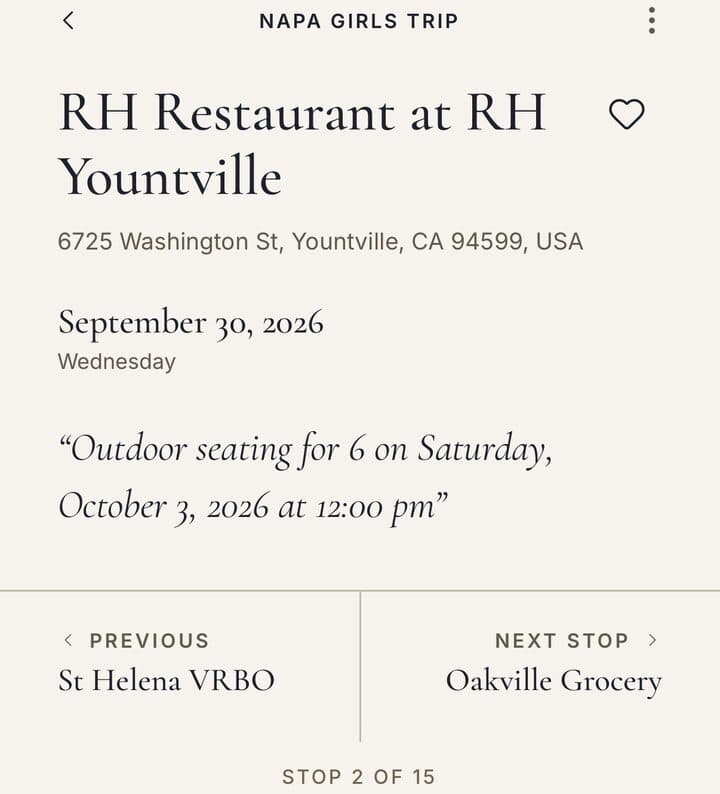
"This is really glitching with those old entries that got transferred over to the September 30 date. If I click into the real RH entry, on Oct 3, I think it automatically kicks me to the empty Sept 30 entry with commentary imported from the email and no pictures."

What we found
- Trip rows identified a stop by its place, not by the visit. The September 30 reservation and the real October 3 visit were at the same place, so tapping either one opened the first.
What we changed
- Trip rows, photo chapters and map pins open the exact visit that was tapped.App, apps/mobile/app/trip/[id].tsx and the trip list components
Status
- Checked on the simulator before and after the change. Before, the later row opened the earlier visit. After, each row opens its own visit.
- App change: Available in TestFlight. Roxy's use of build 27 is confirmed, and build 28 is available in the same group. The public App Store release remains held.
Ongoing Trip summary on the Trips tab (request)
Roxy reported
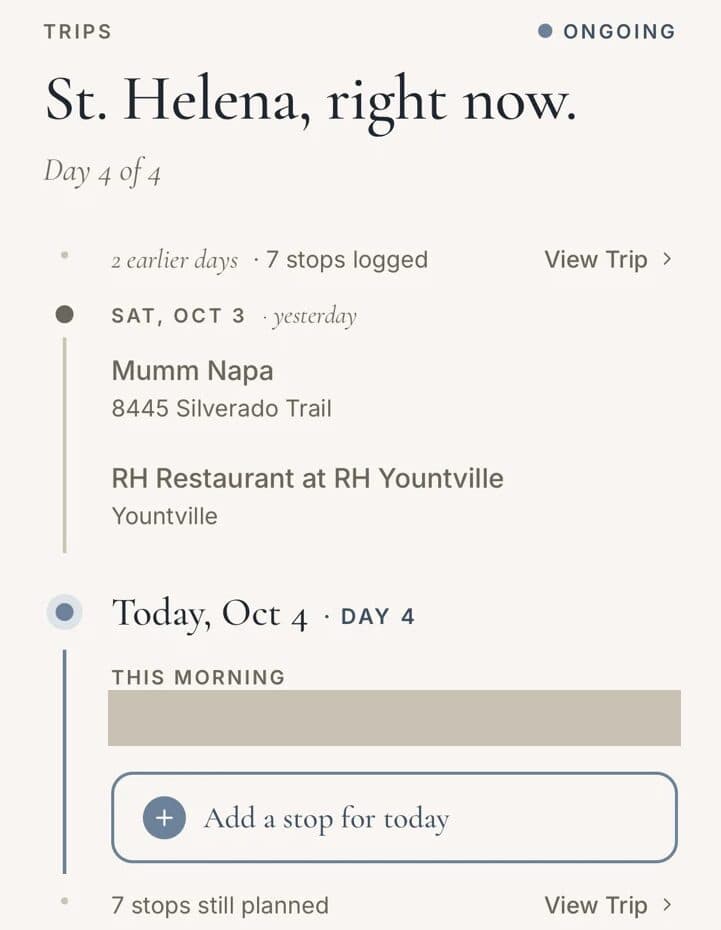
"Following us on the "Ongoing Trip" view, I kind of think we hide this and just direct to the "current trip." Only bc there's a bunch of logic here on what to show that may or may not necessarily make sense to user and might be easier to just show Current Trip: Napa Girls Trip, and allow the user to click into the trip."
What we changed
- The Trips tab shows "Current Trip" with the trip's name, and tapping it opens the trip. The day-by-day summary was removed. How the current trip is chosen did not change.App, apps/mobile/src/trips/Trips.tsx
Status
- Checked on the simulator, including no current trip and overlapping trips.
- App change: Available in TestFlight. Roxy's use of build 27 is confirmed, and build 28 is available in the same group. The public App Store release remains held.
Removing a saved place from a trip had no labeled control
Roxy asked
"Once I save something to a trip, can I delete it (for example, we didn't end up going to Charlie's)"
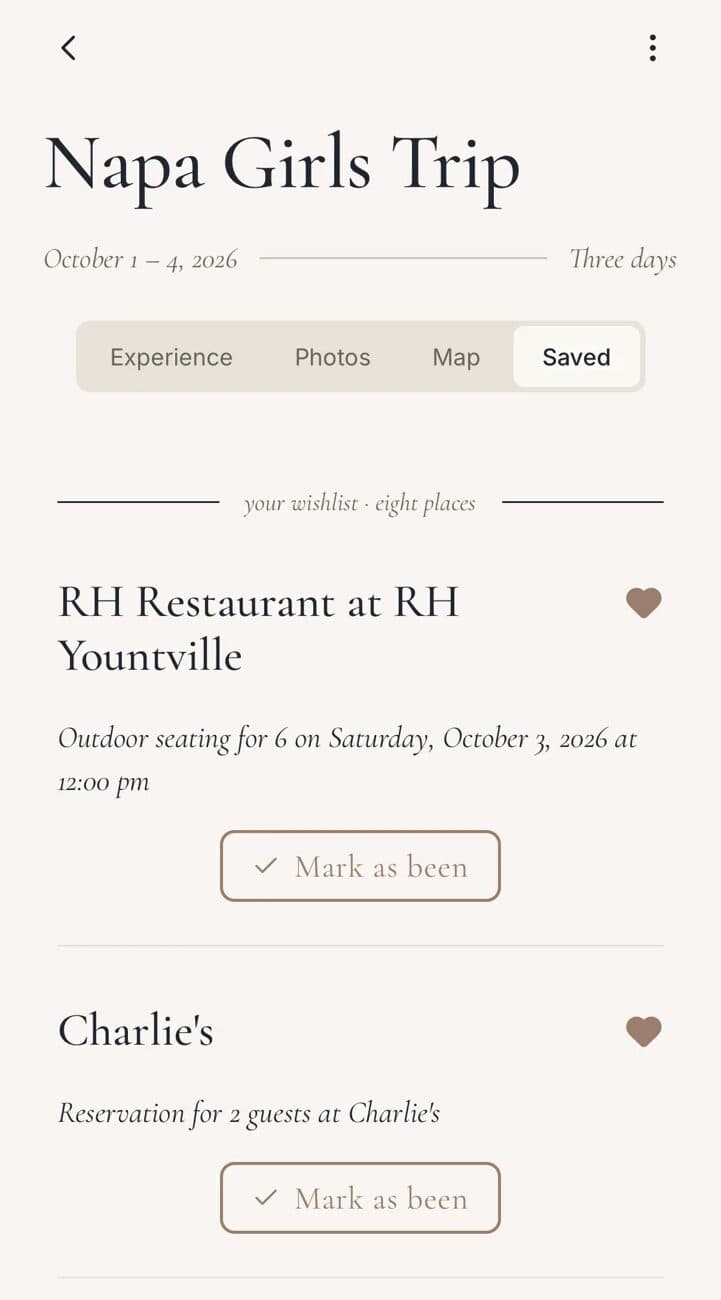
What we found
- Removal already existed, but only as a tap on the filled heart, with no label.
What we changed
- Saved and planned entries show a labeled "Remove from trip" action. The existing confirmation is unchanged.App, apps/mobile/src/trip/TripSaved.tsx
Status
- Checked on the simulator. Cancel keeps the entry, Remove deletes only that entry, and the result persists after a restart.
- App change: Available in TestFlight. Roxy's use of build 27 is confirmed, and build 28 is available in the same group. The public App Store release remains held.
Support tool for reproducing reports
John requested
"should we consider a way to clone trip, stop or other artifact a user might encounter to make it much much easier in the future to support and debug?"
What we changed
- An operator command copies one trip and its stops into Beenlist's own test account on the staging server, so support can reproduce a report without signing in as the user. It reads the original trip without changing it. It does not copy photos, friends or notifications.Server scripts, apps/api/scripts/support/
Status
- Tested on staging with test data only. Merged with this release. No app update is involved.