Roxy asked for clearer notification wording, a shorter explanation of photo locations, and sharing restrictions to appear only after tapping Share. She also reported that a winery visit had moved into Saved even though it had photos and a review. This release includes the higher onboarding interest limit from October 5.
Status
- The server fixes are live. The notification wording, photo-location screen and interest limit are available in TestFlight version 1.0.0, build 28, in Roxy's tester group. We have not confirmed that she has installed it.
- The stop-menu change is available in TestFlight version 1.0.0, build 29, in Roxy's tester group. Build 29 also includes all the build 28 changes. We have not confirmed that she has installed it.
- Build 26 is still the build selected for Apple review, set to manual release. We did not publish a production over-the-air update or an App Store release.
Show sharing restrictions only after tapping Share
Roxy asked
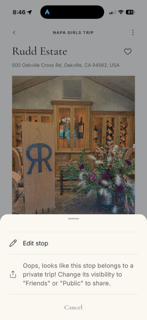
"Can we have the bottom language only show up if you try to click share from this screen? I think it looks odd from here, esp if you just want to edit."
Roxy's screenshot shows the sharing explanation inside the stop menu. We confirmed that behavior in the stop screen's code. The screenshot's app build is unknown.
What we found
- For a restricted stop, the menu showed the sharing explanation in place of Share stop. People saw it even when they only wanted to edit.
- The owner's trip menu already waited for a tap on Share trip before showing its restriction message.
What we changed
- The stop menu now shows Edit stop and Share stop. The existing sharing explanation appears only after tapping Share stop when sharing is restricted. Editing a stop does not show that message.App, apps/mobile/app/visit/[id].tsx
- Allowed sharing still opens the recipient picker. Friend stops keep their Report action and their existing sharing restrictions. Privacy permissions are unchanged.
Status
- The change passed TypeScript, affected-file lint and an independent code review. A development overlay prevented the simulator interaction check, so we have not confirmed the finished interaction on a device.
- Available in TestFlight version 1.0.0, build 29, in Roxy's tester group. Build 28 does not include this change. The App Store submission remains on build 26.
- Ticket: https://app.artifacts.md/john-curtis/beenlist-roxy-2026-10-05/t/22
Clearer wording for the second notification question
Roxy asked
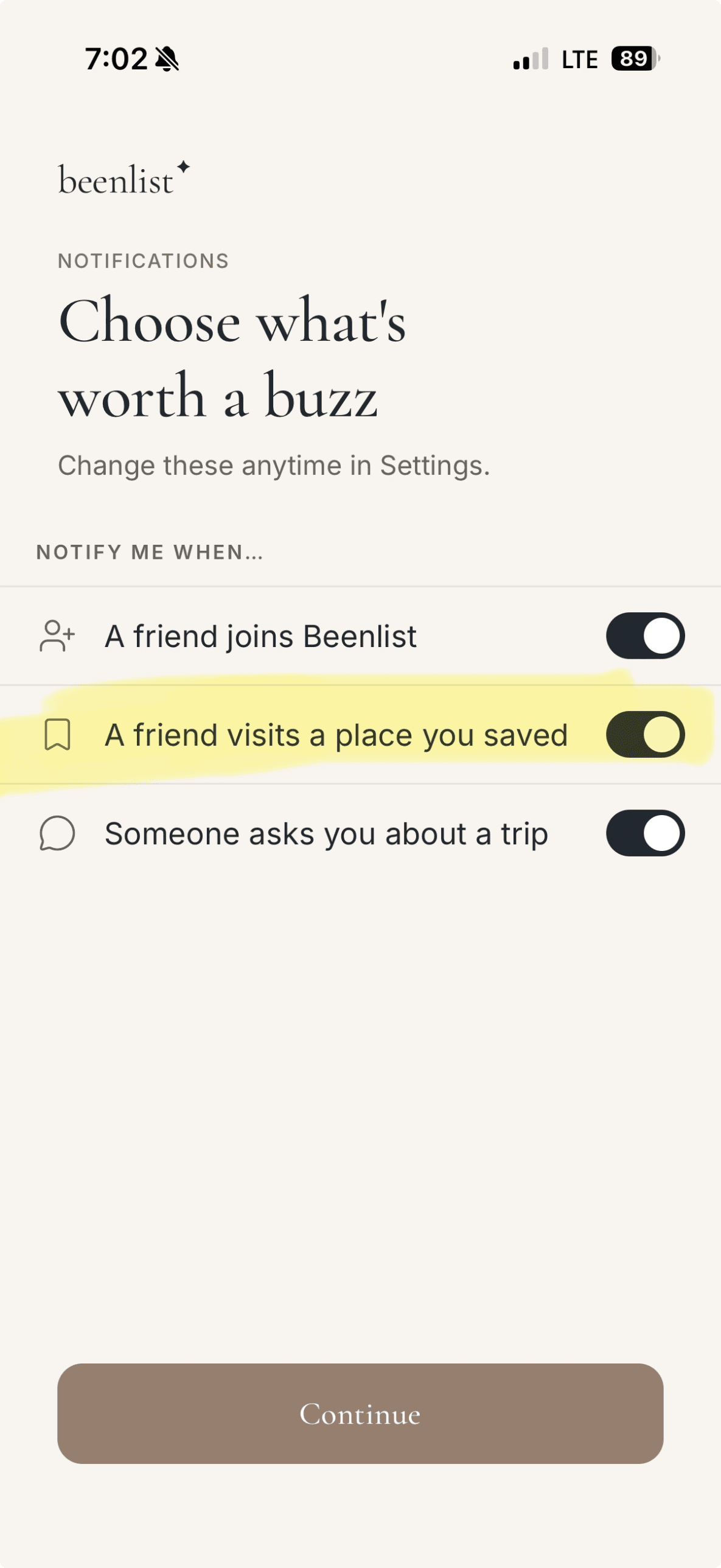
"Can we change the word "saved" to "added" or "recommended" or "logged" for that second notification question? In my mind, "saved" connotes the user saving recommendations they find on the app, esp since we use a bookmark icon next to it."
Roxy's report is about the second preference, which appears in onboarding and in Settings.
What we found
- Onboarding and Settings both showed the row "A friend visits a place you saved" next to a bookmark icon. Together, the word and the icon read as bookmarking a recommendation.
- The app stores this preference, but no notification code reads it yet. Renaming the row does not add a new alert.
What we changed
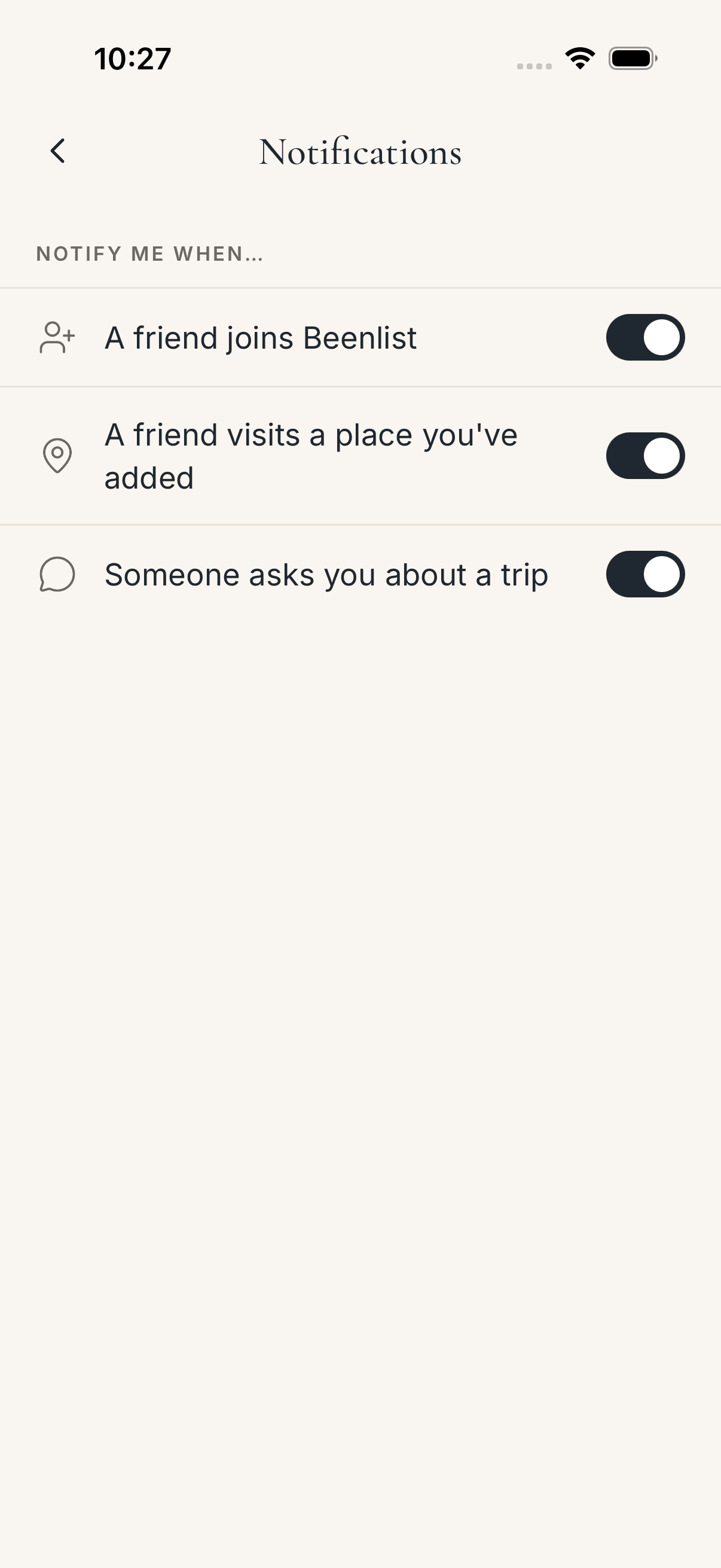
- The row now reads "A friend visits a place you've added" next to a map pin. The stored preference and each person's on/off setting are unchanged.App, apps/mobile/src/settings/NotificationPrefs.tsx
Status
- We checked the row in onboarding and Settings and confirmed that existing on/off settings still load. Available in TestFlight build 28.
- Ticket: https://app.artifacts.md/john-curtis/beenlist-roxy-2026-10-05/t/19
A shorter, illustrated explanation of photo locations
Roxy reported
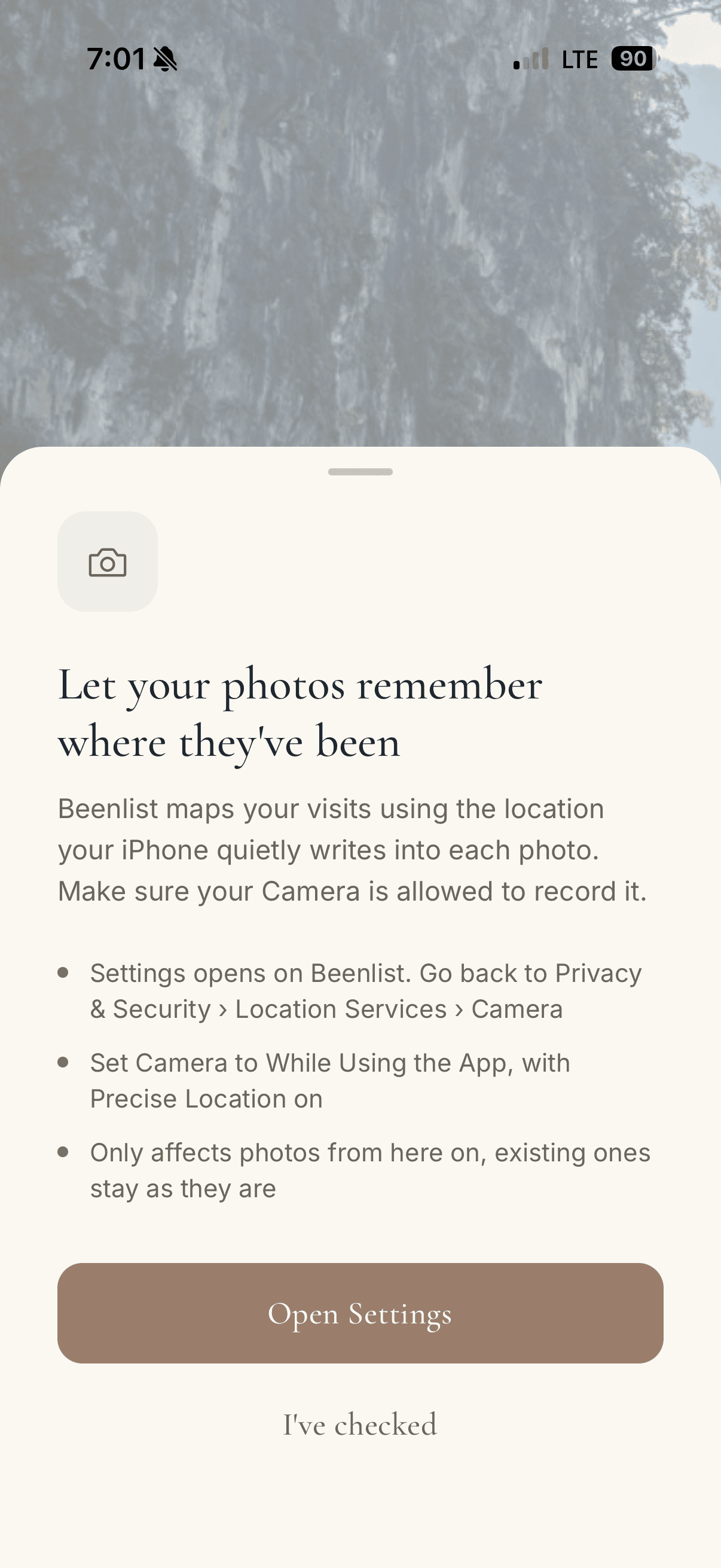
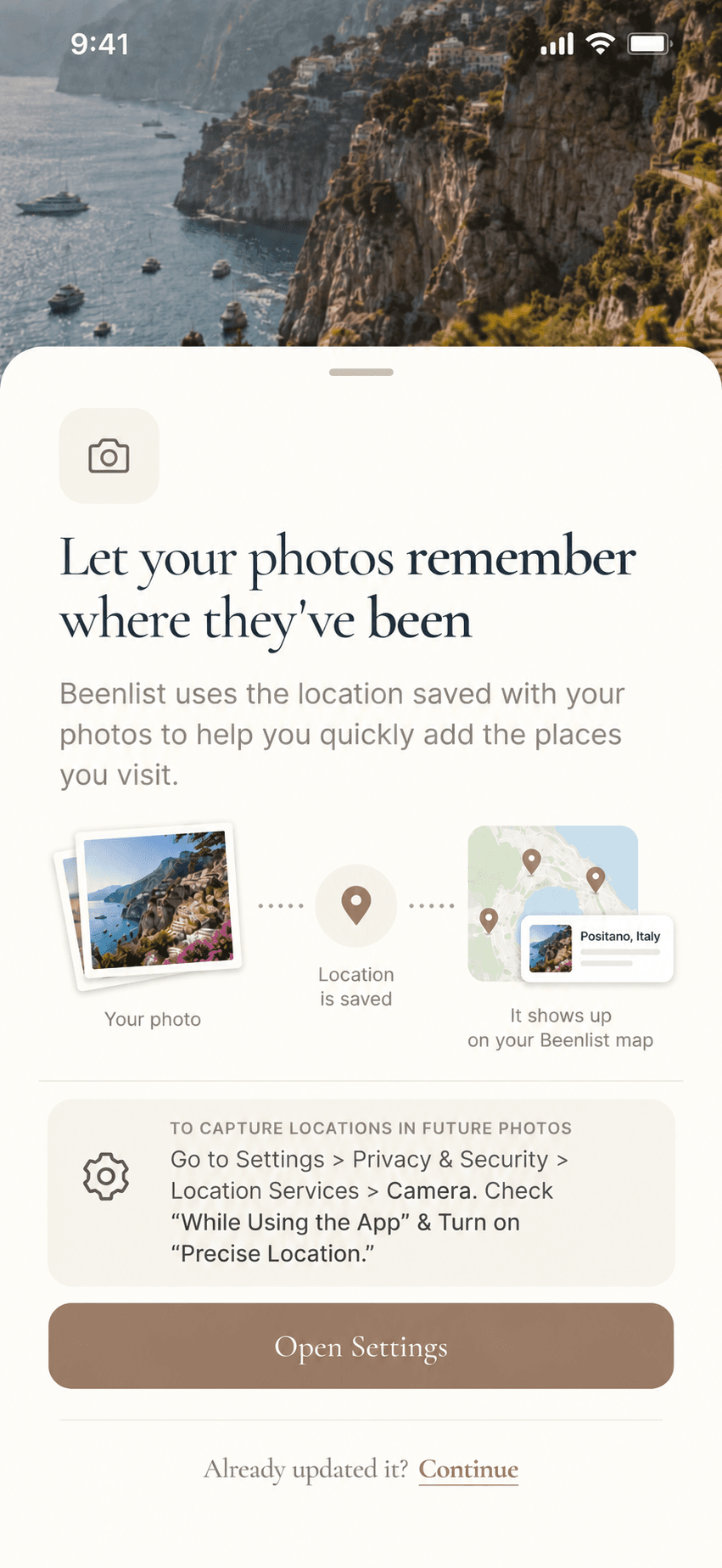
"Finally, sorry I meant to send this yesterday as part and parcel with my other comments, but it fell through the cracks. The notification below looks like a lot of text that a user might not want to take the time to read and it also sounds a little creepy (your phone "quietly" tracks your every move... we all know it happens, but maybe we don't want to hear it). Can we replace it with the mock-up below or something like it?"
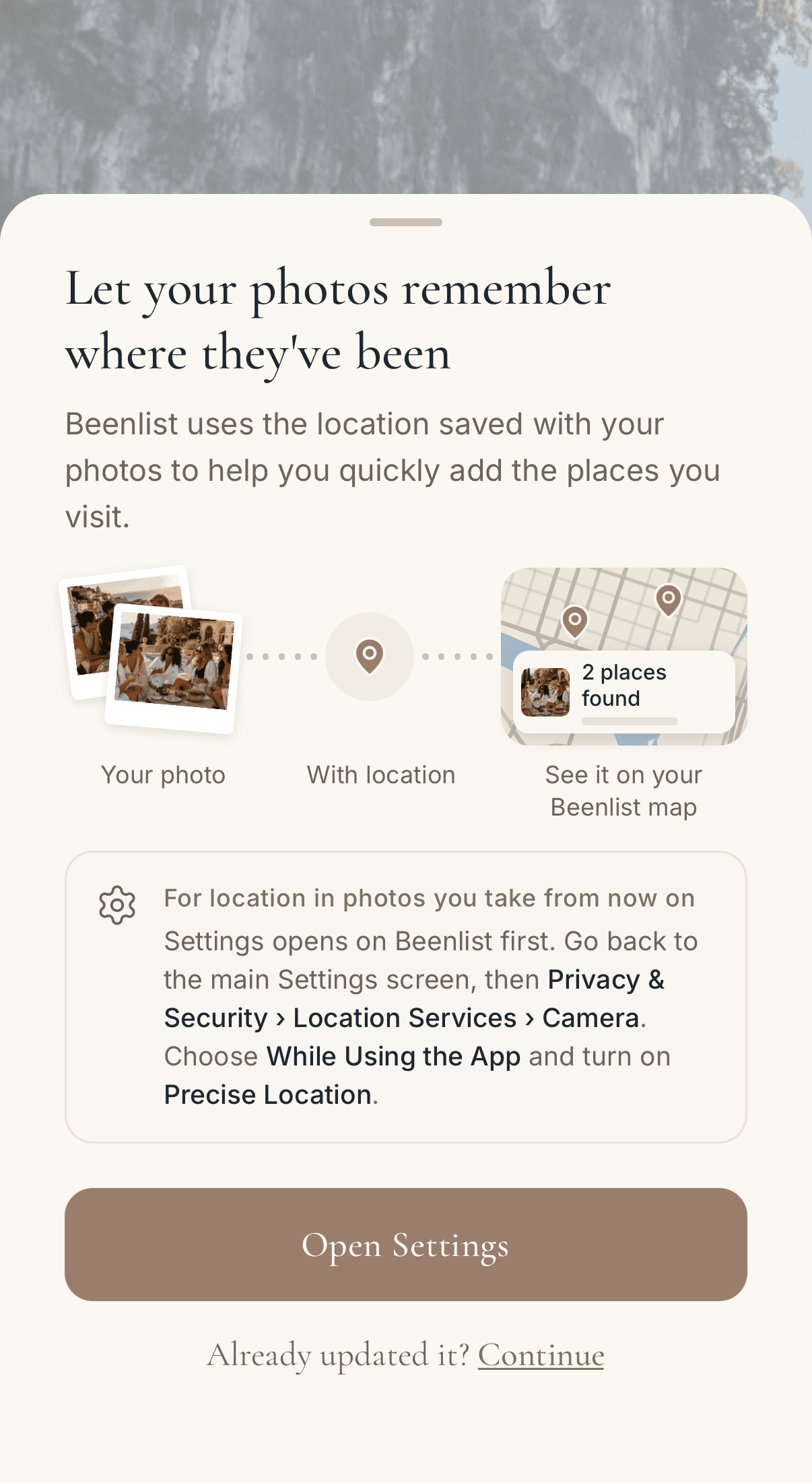
Her first image is the old in-app explanation. Her second image is her proposed design, not a screenshot of the built screen.
What we found
- The screen is about the location your camera saves with each photo. It does not turn on phone tracking. The word "quietly" and the long instructions made that hard to tell.
- Open Settings goes to Beenlist's page in iOS Settings. The instructions need to tell people how to get from there back to the main Settings screen and on to Camera's location setting.
- This flow only works for photos that carry a location. People review the places Beenlist finds and choose which to add. The app does not add every photo to their map on its own.
What we changed
- The screen now uses Roxy's line: "Beenlist uses the location saved with your photos to help you quickly add the places you visit."App, apps/mobile/app/(onboarding)/geo-permissions.tsx and apps/mobile/src/onboarding/photo-location-primer/
- Two photo cards animate in, then dotted connectors, a location pin and a map card with a photo thumbnail. The map image uses Beenlist's own map style. The app draws the cards, pins and connectors in React Native.App, native photo-location illustration and optimized image assets
- The animation plays once. With Reduce Motion on, the screen shows the finished illustration. Open Settings and Continue work while the animation plays.
- The Settings card lists the path: Privacy & Security, Location Services, then Camera. It says the change applies only to photos taken after it. The second button reads "Already updated it? Continue".
Status
- John approved the prototype and the wording. In the simulator we checked the animation, Reduce Motion, and the Open Settings and Continue buttons. We have not measured animation performance on a physical phone.
- Available in TestFlight build 28. We did not change the App Store review submission.
- Ticket: https://app.artifacts.md/john-curtis/beenlist-roxy-2026-10-05/t/20
An edited winery visit moved from Experience into Saved
Roxy reported
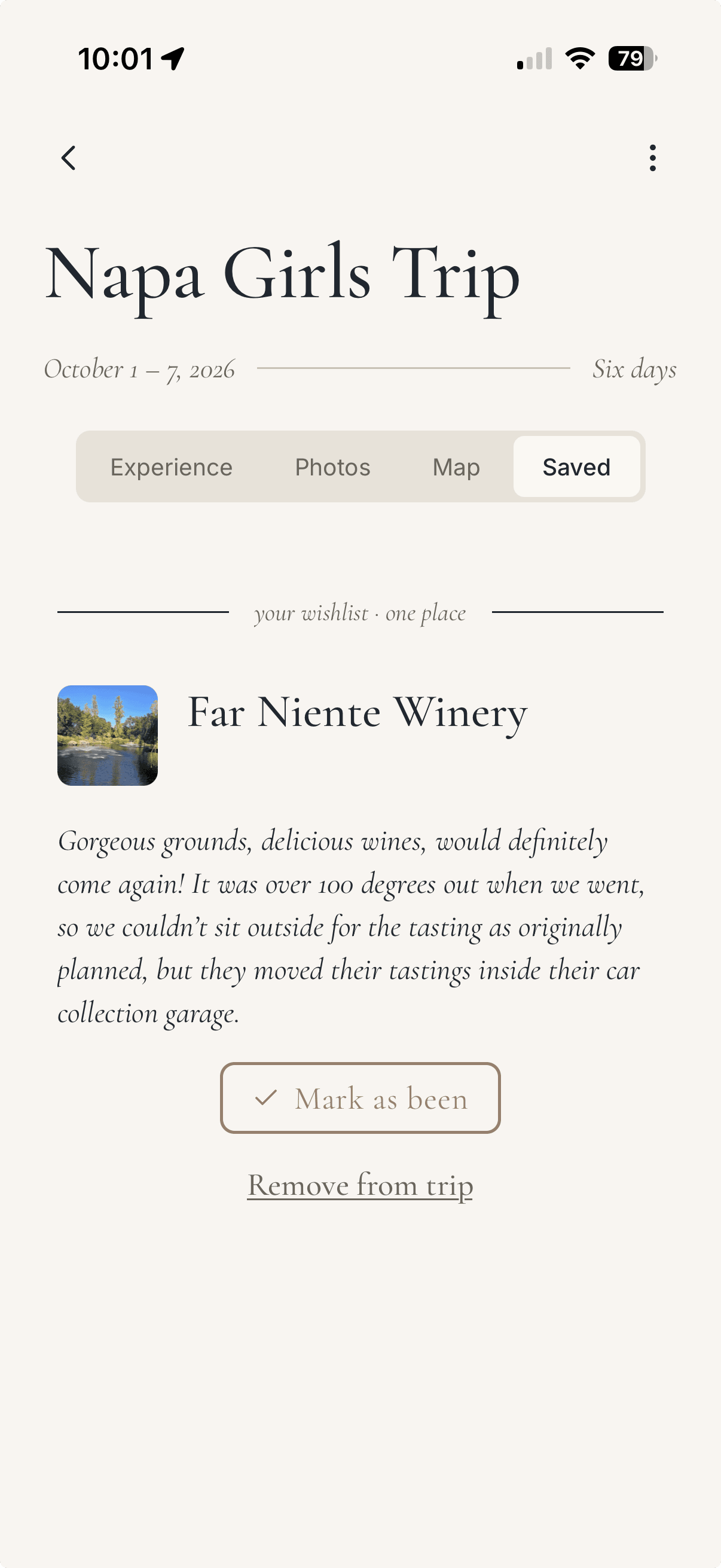
"Still a little glitchy with information moving across Experience and Saved. I had logged Far Niente winery as an actual stop, added pictures and a review. For some reason now it’s showing up under my Saves for this trip."
Her screenshot shows Far Niente in Saved with its photo and review. It does not show what she did just before. We reproduced the status change through the staging API. We have no record of the exact action in her session.
What we found
- When Beenlist automatically changes a stop from planned to visited, it marks the stop as auto-converted. Editing the stop did not clear that mark. If the trip's end date later moved into the future, the server could return the stop to planned and reset its arrival time. The review, rating and photo stayed on the stop, which is how they could appear in Saved.
- Our staging API reproduction used a stop with a review, rating and uploaded photo, and it produced the same status change. It does not prove which action Roxy took.
- The October 5 data repair changed four other reservations and left Far Niente out on purpose. Far Niente's database record was identical before and after that repair. Its status changed the next morning.
What we changed
- Editing a visited stop now clears the auto-converted mark in the same save. A later change to the trip's dates leaves that visit in Experience.Server, apps/api/src/server/trpc/routers/visits.ts
- Mark as been also clears the mark when it moves a stop to visited. If the stop is already visited, it clears any old mark and keeps the recorded arrival time.Server, apps/api/src/server/trpc/routers/trips.ts
- A stop that was auto-converted and never edited can still return to planned when the trip's dates change. Adding a review to a saved stop does not make it visited.
Status
- The fix passed the same review-and-photo test on the staging API, and we deployed it to production. Visits with reviews keep their dates. Plans and saves follow the same rules as before.
- We checked Far Niente's record and did not change it. To move it back to Experience, open it in Saved, choose Mark as been, confirm the date and rating, and save. Its review and four photos stay attached.
- Ticket: https://app.artifacts.md/john-curtis/beenlist-roxy-2026-10-05/t/21